📞 Call Center Management / إدارة مركز الاتصال
Customer service department for handling client calls and routing inquiries efficiently / قسم خدمة العملاء للتعامل مع مكالمات العملاء وتوجيه الاستفسارات بكفاءة
📋 Overview
The Call Center is your customer service department that receives client calls and efficiently directs their inquiries and requests to the appropriate departments within the company. This comprehensive system ensures that every client communication is properly handled and routed to the right team for optimal service delivery.
Customer Service Operations: This section serves as the central hub for all client communications, ensuring that customer inquiries, requests, and issues are properly documented and forwarded to the appropriate departments for professional handling and resolution.
📋 نظرة عامة
مركز الاتصال هو قسم خدمة العملاء الذي يستقبل مكالمات العملاء ويوجه استفساراتهم وطلباتهم بكفاءة إلى الأقسام المناسبة داخل الشركة. يضمن هذا النظام الشامل التعامل مع كل تواصل من العميل وتوجيهه للفريق المناسب لتحقيق أفضل خدمة.
عمليات خدمة العملاء: يعمل هذا القسم كمركز رئيسي لجميع اتصالات العملاء، ويضمن توثيق جميع الاستفسارات والطلبات والمشكلات وتحويلها للأقسام المختصة لمعالجتها بشكل احترافي.
🎯 Call Center Action Buttons
🎯 أزرار مركز الاتصال
🆕 NEW LEAD Button
When a client calls looking for a unit, they are registered as a lead so that the sales department can contact them and follow up. This process was explained previously in the New Leads section, detailing how to add leads to the system for proper sales follow-up.
🆕 زر عميل جديد
عند اتصال عميل يبحث عن وحدة، يتم تسجيله كعميل محتمل ليقوم قسم المبيعات بالتواصل معه والمتابعة. تم شرح هذه العملية سابقًا في قسم العملاء الجدد.
This button is used when a client calls again for follow-up or additional assistance. When clicked, it requires the following information:
• Mobile: Client's phone number for identification and contact
• Leads ID*: Required field - the unique identifier for the existing lead
• Assign To: Designate which team member will handle this recall
• Projects: Specify which projects are relevant to this recall
• Note: Detailed description of the recall purpose and client needs
• Tag: Classification or priority level for the recall
• Branches: Specify which branch will handle this recall
يُستخدم هذا الزر عند اتصال العميل مرة أخرى للمتابعة أو طلب مساعدة إضافية. عند الضغط عليه، يتطلب المعلومات التالية:
• الجوال: رقم هاتف العميل للتعريف والتواصل
• رقم العميل المحتمل*: حقل مطلوب - المعرف الفريد للعميل المحتمل
• تعيين إلى: تحديد عضو الفريق الذي سيتولى المتابعة
• المشروعات: تحديد المشروعات ذات الصلة بالمتابعة
• ملاحظة: وصف تفصيلي لغرض المتابعة واحتياجات العميل
• وسم: تصنيف أو أولوية للمتابعة
• الفروع: تحديد الفرع الذي سيتولى المتابعة
💡 Best Practice
It's recommended to write all information in detail to facilitate easy fulfillment of client requests, whether it's a request, inquiry, or problem resolution.
💡 أفضل ممارسة
يُنصح بكتابة جميع المعلومات بالتفصيل لتسهيل تلبية طلبات العملاء بسهولة سواء كانت طلبًا أو استفسارًا أو حل مشكلة.
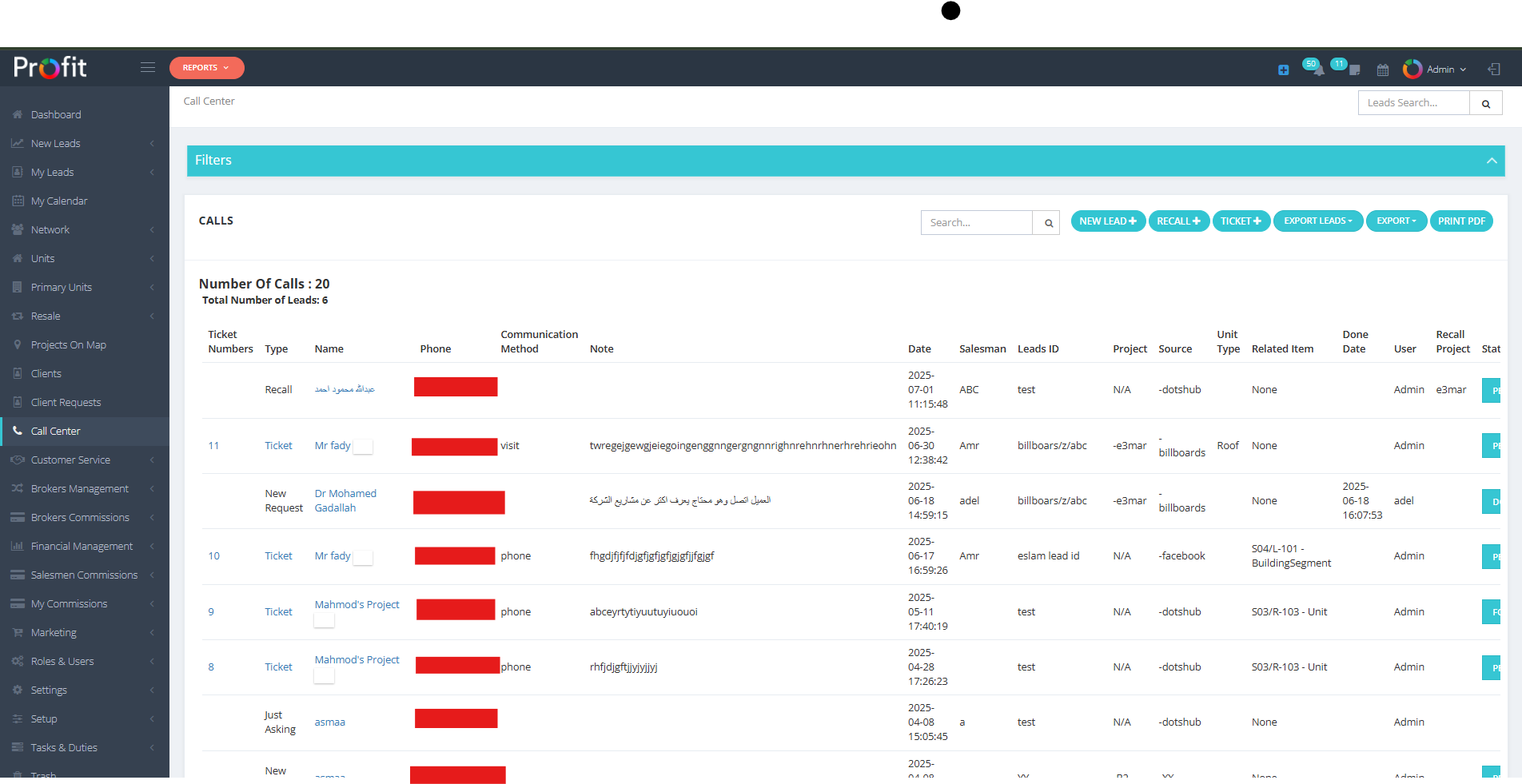
Call Center Interface
واجهة مركز الاتصال
🎫 TICKET Button & Support System
🎫 زر التذكرة ونظام الدعم
This button is used to open a support ticket for the client. The ticket system requires client and ticket information:
يُستخدم هذا الزر لفتح تذكرة دعم للعميل. يتطلب نظام التذاكر معلومات عن العميل والتذكرة:
📱 Contact Information
Mobile: Client's phone number - must be a registered client to appear in the system.
Communication Method*: Ask the client about their preferred communication method for follow-up and updates.
📱 معلومات الاتصال
الجوال: رقم هاتف العميل - يجب أن يكون عميلًا مسجلاً ليظهر في النظام.
طريقة التواصل*: اسأل العميل عن طريقة التواصل المفضلة لديه للمتابعة والتحديثات.
📅 Date Information
- Call Date: The current date when the call is received.
- Delivery Judgement Date: The expected date for providing a response or resolution to the client.
- Contract Date: The contract date with the client (if applicable).
📅 معلومات التاريخ
- تاريخ المكالمة: التاريخ الحالي عند استلام المكالمة.
- تاريخ الحكم على التسليم: التاريخ المتوقع لتقديم استجابة أو حل للعميل.
- تاريخ العقد: تاريخ العقد مع العميل (إن وجد).
📝 Ticket Content & Classification
- Ticket Content: Write detailed information about the request or issue for which the support ticket is being opened. Include all relevant details to ensure proper handling.
- Ticket Type: Select from the ticket types configured in your system by your administrator. These categories help organize and route tickets appropriately.
- Tag: Specify the importance level or priority of the ticket to ensure appropriate response time and resource allocation.
📝 محتوى التذكرة والتصنيف
- محتوى التذكرة: اكتب معلومات مفصلة عن الطلب أو المشكلة التي يتم فتح التذكرة من أجلها. قم بتضمين جميع التفاصيل ذات الصلة لضمان المعالجة الصحيحة.
- نوع التذكرة: اختر من أنواع التذاكر المكونة في نظامك بواسطة المسؤول. تساعد هذه الفئات في تنظيم وتوجيه التذاكر بشكل مناسب.
- وسم: حدد مستوى الأهمية أو أولوية التذكرة لضمان استجابة مناسبة وتخصيص الموارد.
🏢 Assignment & Categories
Branches: Select the branch that will receive and handle this ticket.
Type: Choose the appropriate category for ticket handling:
- Projects: For project-related issues
- Developer Project: For developer or construction-related matters
- Resale Units: For resale property matters
Files & Gallery: Upload any images and files that need to be attached to the ticket for better context and documentation.
🏢 التعيين والفئات
الفروع: اختر الفرع الذي سيتلقى هذه التذكرة ويتعامل معها.
النوع: اختر الفئة المناسبة لمعالجة التذكرة:
- المشروعات: لقضايا تتعلق بالمشروعات
- مشروع المطور: لمشاكل تتعلق بالمطور أو البناء
- وحدات إعادة البيع: لمشاكل تتعلق بالعقارات المعاد بيعها
الملفات والمعرض: قم بتحميل أي صور وملفات تحتاج إلى إرفاقها بالتذكرة للحصول على سياق أفضل وتوثيق.
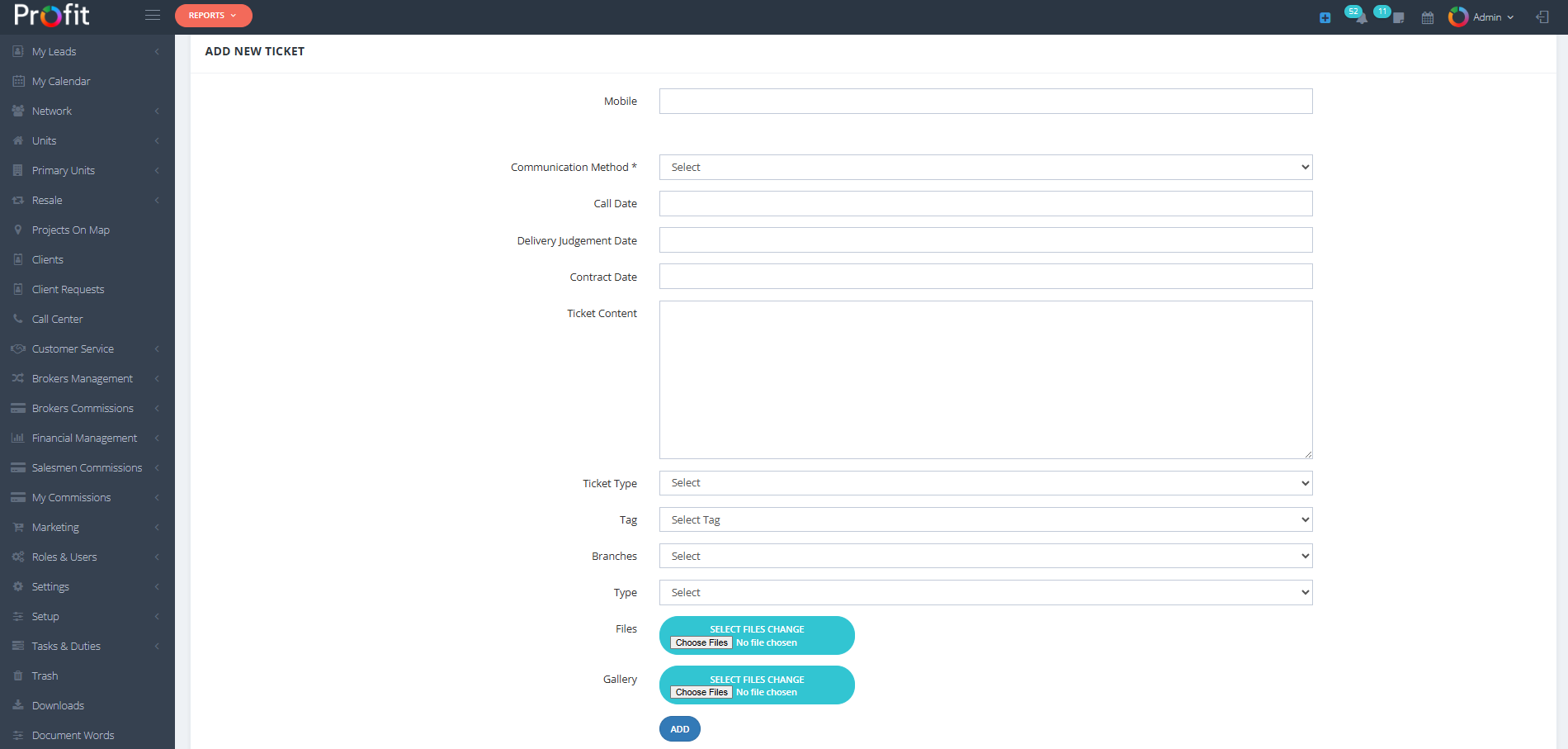
Add New Ticket Interface
واجهة إضافة تذكرة جديدة
🔧 Additional System Functions
🔧 وظائف النظام الإضافية
📤 EXPORT LEADS Button
This function allows you to export lead data if you have the appropriate permissions. This feature supports data analysis, reporting, and external system integration.
🖨️ PRINT PDF Button
Generate and print data in PDF format for documentation, record-keeping, and offline reference purposes.
📤 زر تصدير العملاء المحتملين
تتيح لك هذه الوظيفة تصدير بيانات العملاء المحتملين إذا كانت لديك الأذونات المناسبة. تدعم هذه الميزة تحليل البيانات، وإعداد التقارير، ودمج الأنظمة الخارجية.
🖨️ زر طباعة PDF
قم بإنشاء وطباعة البيانات بتنسيق PDF لأغراض التوثيق، وحفظ السجلات، والرجوع إليها في وضع عدم الاتصال.
This call center system ensures that every client interaction is properly documented, categorized, and routed to the appropriate department for professional handling, maintaining high standards of customer service and operational efficiency.
يضمن نظام مركز الاتصال هذا توثيق كل تفاعل مع العميل بشكل صحيح، وتصنيفه، وتوجيهه إلى القسم المناسب للتعامل الاحترافي، مع الحفاظ على معايير عالية من خدمة العملاء وكفاءة التشغيل.
🔍 Call Center Filter System
🔍 نظام تصفية مركز الاتصال
The Call Center includes a comprehensive filter system that allows you to search and organize call records, tickets, and client interactions efficiently. Use these filters to quickly locate specific calls or analyze call patterns.
يتضمن مركز الاتصال نظام تصفية شامل يتيح لك البحث وتنظيم سجلات المكالمات والتذاكر وتفاعلات العملاء بكفاءة. استخدم هذه الفلاتر لتحديد موقع مكالمات معينة بسرعة أو لتحليل أنماط المكالمات.
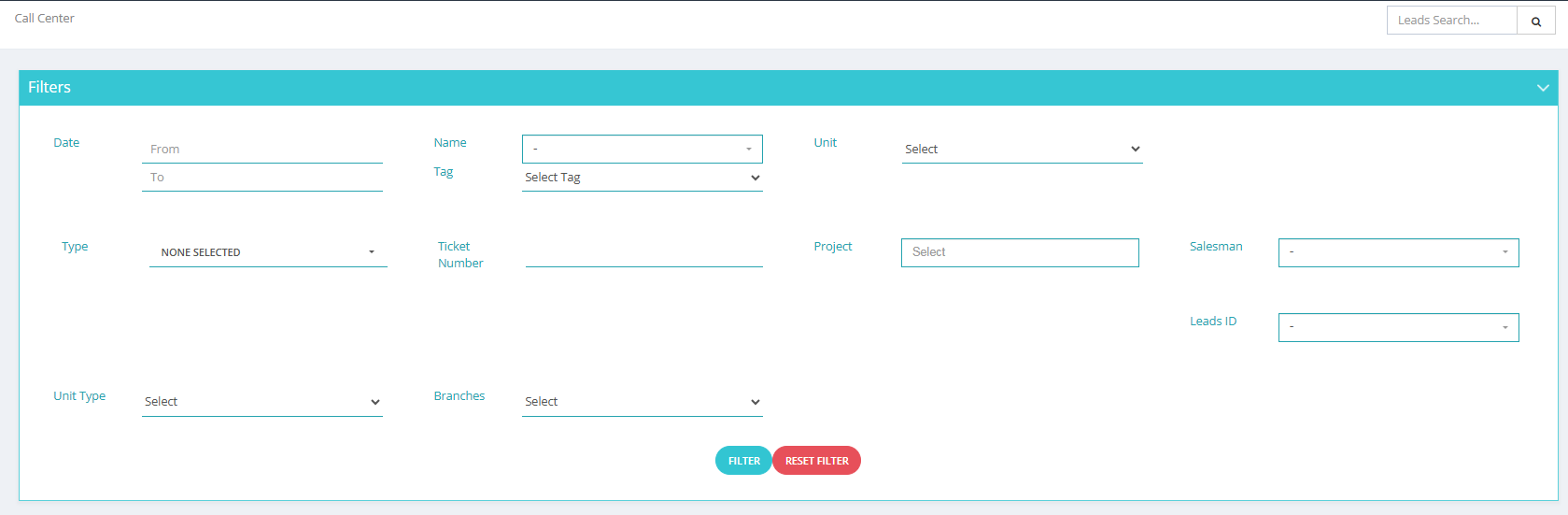
Call Center Filter Interface
واجهة تصفية مركز الاتصال
This filter system uses AND logic, not OR logic. This means ALL selected filter criteria must be met simultaneously for results to appear. Be careful when combining multiple filters as this may significantly narrow your results or return no matches if the criteria are too restrictive.
يستخدم نظام التصفية هذا منطق AND، وليس منطق OR. هذا يعني أنه يجب تلبية جميع معايير التصفية المحددة في نفس الوقت حتى تظهر النتائج. كن حذرًا عند دمج فلاتر متعددة حيث قد يؤدي ذلك إلى تضييق نتائجك بشكل كبير أو عدم إرجاع أي تطابقات إذا كانت المعايير صارمة جدًا.
📋 Available Filter Options
📋 خيارات التصفية المتاحة
📅 Date Range Filters
- From: Set the starting date for your search range
- To: Set the ending date for your search range
👤 Client Information Filters
- Name: Select from registered client names to filter calls by specific customers
- Leads ID: Filter by lead identifier if you know the specific lead source
📅 فلاتر نطاق التاريخ
- من: تعيين تاريخ البدء لنطاق البحث الخاص بك
- إلى: تعيين تاريخ الانتهاء لنطاق البحث الخاص بك
👤 فلاتر معلومات العميل
- الاسم: اختر من أسماء العملاء المسجلين لتصفية المكالمات حسب عملاء محددين
- رقم العميل المحتمل: تصفية حسب معرف العميل المحتمل إذا كنت تعرف مصدر العميل المحدد
🏷️ Priority and Classification Filters
- Tag: Filter by importance level or priority tags assigned to calls and tickets
- Type: Choose from call types including:
- New Request: First-time customer requests
- Ticket: Support ticket calls
- Recall: Follow-up calls
- Just Asking: Information inquiry calls
🏠 Property and Project Filters
- Unit: Select specific units that were discussed in calls
- Unit Type: Filter by the type of unit the client requested
- Project: Choose from available projects to filter project-related calls
🏷️ فلاتر الأولوية والتصنيف
- الوسم: تصفية حسب مستوى الأهمية أو علامات الأولوية المخصصة للمكالمات والتذاكر
- النوع: اختر من أنواع المكالمات بما في ذلك:
- طلب جديد: طلبات العملاء لأول مرة
- تذكرة: مكالمات تذكرة الدعم
- إعادة اتصال: مكالمات المتابعة
- مجرد استفسار: مكالمات استفسار المعلومات
🏠 فلاتر العقارات والمشروعات
- الوحدة: اختر وحدات معينة تم مناقشتها في المكالمات
- نوع الوحدة: تصفية حسب نوع الوحدة التي طلبها العميل
- المشروع: اختر من المشاريع المتاحة لتصفية المكالمات المتعلقة بالمشروعات
🎫 System and Assignment Filters
- Ticket Number: Enter specific ticket number if known for direct ticket lookup
- Salesman: Filter by the salesman assigned to handle the ticket or call
- Branches: Select the branch assigned to handle the ticket or call
🎫 فلاتر النظام والتعيين
- رقم التذكرة: أدخل رقم التذكرة المحدد إذا كان معروفًا للبحث المباشر عن التذكرة
- البائع: تصفية حسب البائع المعين للتعامل مع التذكرة أو المكالمة
- الفروع: اختر الفرع المعين للتعامل مع التذكرة أو المكالمة
- Start with broader criteria and narrow down gradually
- Remember that all selected filters must match simultaneously (AND logic)
- Use date ranges to limit results to specific time periods
- Combine client name with project filters for targeted searches
- Use ticket numbers for direct, specific ticket lookups
- Filter by salesman to review individual performance or assignments
- ابدأ بمعايير أوسع ثم قم بالتضييق تدريجياً
- تذكر أن جميع الفلاتر المحددة يجب أن تتطابق في نفس الوقت (منطق AND)
- استخدم نطاقات التاريخ لتحديد النتائج لفترات زمنية محددة
- اجمع بين اسم العميل وفلاتر المشروع للبحث المستهدف
- استخدم أرقام التذاكر للبحث المباشر عن التذاكر المحددة
- تصفية حسب البائع لمراجعة الأداء الفردي أو التعيينات